
Headroom AI
How much of your rate limit is left across every Claude Code and Codex account, in the macOS menu bar.
macOS 14+ · MIT licence · free
Why it exists
Claude Code and Codex only ever show the account you happen to be logged into. With a dozen subscriptions, finding one you can still work on means switching and checking. Over and over.
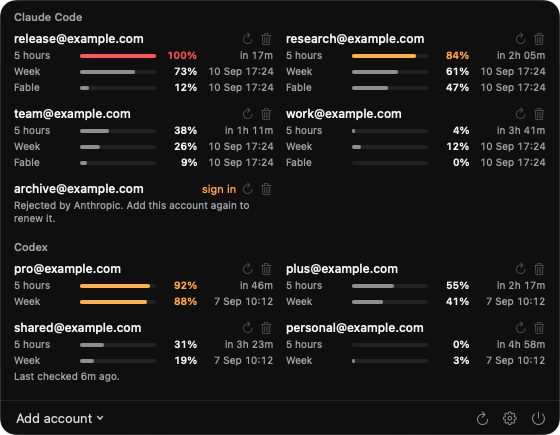
I wrote this for myself, because I was doing that every day. Headroom polls every account at once and shows them in a single menu bar panel. Since it might be useful to someone else, it sits open on GitHub.
What it shows
Every limit window at once
Each account gets a cell, with one line per limit window the provider reports: the five-hour one, the weekly one, and per-model limits. You see how much is gone and when it comes back.
Claude Code and Codex side by side
One Anthropic account or ten, plus your OpenAI ones. All in a single panel, added by signing in through your browser as usual. There are no API keys to paste.
One indicator per provider
Because running out of Claude Code is not helped by Codex sitting idle. You choose what the number means: the emptiest account, the fullest one, or how many still have room.
Colour only when it is needed
Amber past 80%, red at 100%, and quiet otherwise. A calm row is a healthy row, and you do not have to read it.
Take it and use it
Free, MIT licensed. If something is missing or broken, open an issue on GitHub.